Firebase app handover checklist: access, billing and evidence before a takeover
Separate Firebase project access, organization control, billing and reproducible test evidence before a developer takeover. Includes a blank, ungated evidence worksheet.
A Firebase handover is not one password or one Owner invitation. Before a new developer estimates changes, separate who can administer the project, which organization contains it, who pays the bill, and what evidence shows the app can be maintained.
This is a planning guide based on the current Firebase and Google Cloud documentation, checked on 19 November 2026. It is not a review of your project, a transfer procedure, a security certification or a promise that a change will be risk-free. We have not performed a Firebase migration for this article.
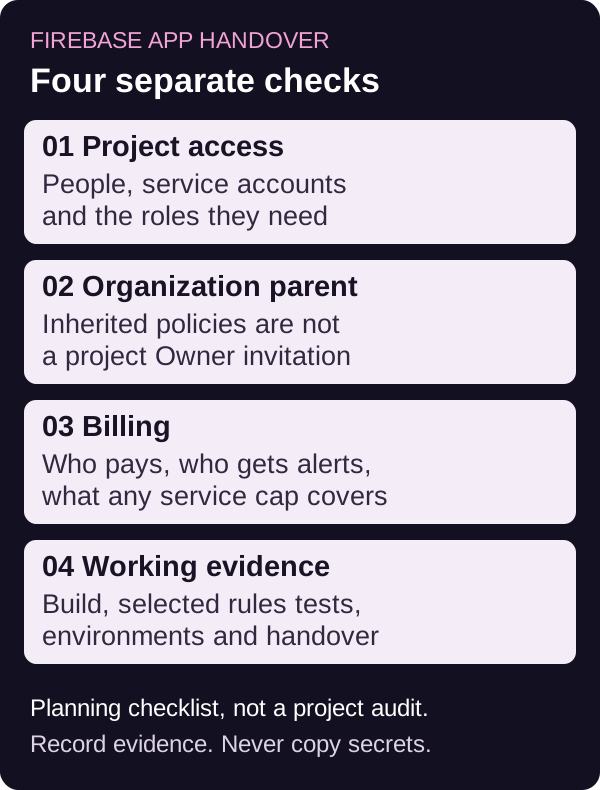
Start with an evidence worksheet, not shared credentials
Download the blank Firebase handover worksheet (CSV). It contains prompts, evidence to ask for and blank status fields. Open it in a spreadsheet or text editor and keep it in your own controlled project records. There is no signup or upload on this page, and the download does not send a completed copy to Omnistu.
Use labels such as verified, unknown, blocked and not applicable. A verbal assurance is not the same as evidence. Add a date and a responsible role to unresolved items. Store only a safe evidence description or a link with suitable access controls, not passwords, service-account private keys, tokens, real member records or payment details.
1. Separate project access from organization control
Firebase's IAM documentation describes basic, predefined and custom roles. It also explains that the Firebase console's member list does not show service accounts; the Google Cloud IAM page provides a broader view.
Ask the current team to identify the project, its environments, the people and service accounts with access, and who is authorized to approve access changes. Record roles and responsibilities in the handover, not a copied account password. Choose permissions for the actual work rather than assuming every replacement developer needs Owner.
Also establish whether the project belongs to an organization or folder. Google's project-migration documentation distinguishes direct project IAM grants from inherited roles and organization policies. Those inherited controls can change when a project moves. A project-level Owner invitation is not evidence that an organization move has happened.
Do not remove the old team's access as an unplanned first step. Agree who can authorize the transition, which dependencies use that access, how the receiving team will verify its access, and what the change and recovery plan requires. This guide does not establish your contractual ownership or authority to move a project.
2. Record billing as a separate handover item
Google's migration documentation says that moving a project to a different organization leaves its linked billing account unchanged. Google's billing-account change guide describes separate permissions and consequences for changing that link. Charges incurred before a change can still reach the former billing account after the change.
Ask who controls the linked Cloud Billing account, who receives relevant alerts, which products are in use and who will review unusual costs. Record the agreed responsibility for existing charges separately from future usage. Do not assume that a new project Owner means a new payer.
An alert is not the same as a cap
The current Firebase budget documentation distinguishes two mechanisms:
- Alerts-only budgets send notifications and do not pause services.
- Spend cap budgets can pause an applicable service for the rest of the month when its budget reaches 100%. The page currently lists Firebase AI Logic, Firebase App Hosting, Cloud Functions for Firebase and Firebase Extensions as the supported services.
Do not generalize that service-specific list into a cap for the whole project or for Cloud Firestore. Record which mechanism is actually configured, its scope, recipients and the consequence of a pause. Check the current provider documentation and your project's settings before relying on it. This worksheet does not enable a cap, change billing or recommend disabling a live service.
3. Ask for rules and test evidence, not "it has login"
Firebase's security checklist recommends testing Security Rules with the Local Emulator Suite and adding tests to CI. Its environment guidance recommends separating pre-production from production and applying appropriate access controls in both.
For a takeover discussion, ask which Firebase products the app actually uses, where the rules and configuration are maintained, and whether there is a reproducible local or staging test setup. Ask for evidence of an allowed action and a denied action for the selected user roles. A working sign-in screen alone does not answer which records a user can read or change.
Keep the boundary clear: emulator tests for supported products can provide evidence for the cases they run. They do not certify every production permission, integration or abuse scenario. Do not copy a real customer database into a worksheet or an unrestricted test environment to make the review easier.
4. Make the next decision smaller than "rewrite everything"
Prepare a non-confidential summary containing:
- The app platforms, Firebase products and environments in use.
- The symptom or change you need, and what a successful result would look like.
- Whether project access, organization control and billing responsibility are verified or still unknown.
- Whether another developer can reproduce the relevant build and run the selected tests without depending on the previous developer's personal machine.
- Open risks and decisions, with an owner for each next check.
Use the general codebase handoff checklist for repositories, releases, backups and documentation beyond Firebase. An evidence gap may call for a bounded review before anyone can responsibly estimate repairs. It does not, by itself, prove that the app must be rebuilt or that it is safe to keep unchanged.
If you want to discuss engineering help, the Firebase development scope page describes the areas Omnistu can discuss. Bring a non-confidential summary and the worksheet's unresolved questions. Any access, review, implementation, cost or delivery commitment needs its own agreed scope; sending a summary does not start paid work.
Why this is a buyer problem, not just an admin task
Community questions such as transferring a Firebase app to a client's account for billing and whether changing project owners affects an existing app show that people ask these questions during handover. Their answers span different dates and are not this guide's transfer instructions. The provider documentation linked above grounds the technical distinctions.
Those examples do not establish current search volume, how often handovers fail, or a result for an Omnistu customer. The useful outcome is a clearer evidence request before a buyer shares access, pays for a review or agrees to implementation.