Gemini 4 Neon API pricing: how to estimate what your workload will cost before and after 1 December
Gemini 4 Neon costs $3 per million input tokens and $15 per million output, while Carbon and Argon double on 1 December. The official rates, a worked cost estimate you can adapt, and the token threshold at which Neon actually saves money.
Google released Gemini 4 Neon on 18 November 2026. The list price is simple. What it costs you per finished task is not, because Google is also raising the price of two other Gemini 4 models on 1 December and because output pricing includes thinking tokens. This guide gives the official prices, a worked estimate you can copy, and the one comparison that decides whether Neon saves money. Prices and claims below are Google's, read on 19 November 2026. The arithmetic is ours. We did not run any model.
The list prices, from Google's pricing page
All prices are per 1 million tokens on the paid tier, in US dollars.
| Model | Input | Cached input | Output (includes thinking) |
|---|---|---|---|
| Gemini 4 Hydrogen | $1.50 | $0.075 | $7.50 |
| Gemini 4 Carbon and Argon, through 30 Nov 2026 | $2.00 | $0.10 | $10.00 |
| Gemini 4 Neon | $3.00 | $0.15 | $15.00 |
| Gemini 4 Carbon and Argon, from 1 Dec 2026 | $4.00 | $0.20 | $20.00 |
Other points the page and launch post state:
- Neon has a 1 million-token context window. Google's launch post lists the same $3 and $15 prices.
- Neon, Carbon and Argon are not available on the free tier. Hydrogen is.
- Caching is implicit only. The page says explicit caching is not supported for these models.
- Every token is billed, "including thinking tokens". Output price covers thinking.
- Google Search grounding: 5,000 free requests per month shared across Gemini 3 and newer models, then $14 per 1,000 requests, with a daily cap of 1,500.
A worked estimate you can adapt
Take an example coding-agent session with 50 model calls. Each call sends 80,000 input tokens, 90% of which come from cache, and returns 2,500 output tokens including thinking. That is our made-up workload, not Google's. It adds up to 0.4 million fresh input tokens, 3.6 million cached input tokens and 0.125 million output tokens.
The cost is fresh input times the input price, plus cached input times the cache price, plus output times the output price. For Neon: 0.4 x $3.00 + 3.6 x $0.15 + 0.125 x $15.00 = $1.20 + $0.54 + $1.875 = $3.615.
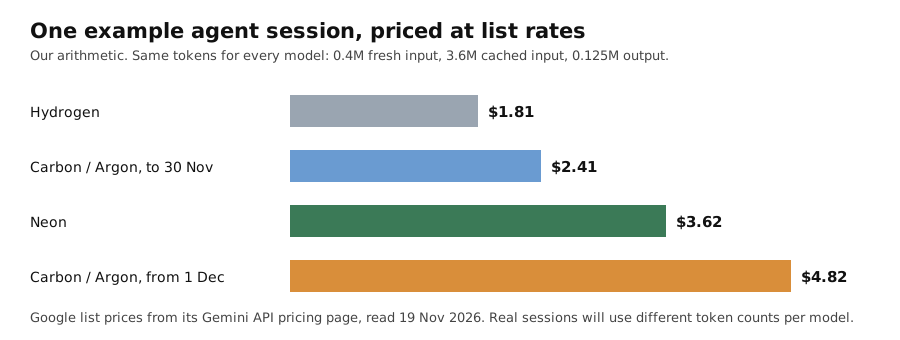
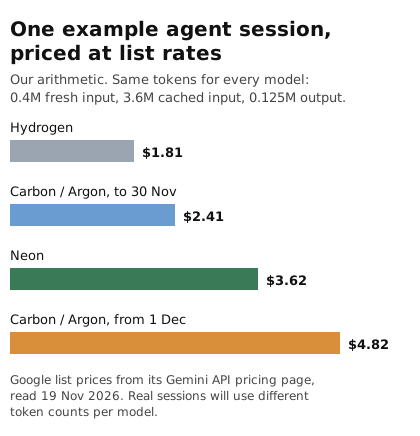
Original chart by Omnistu from Google's list prices and our example token counts. Not a benchmark.
With the same token counts, the example session costs $1.81 on Hydrogen, $2.41 on Carbon or Argon until 30 November, $3.62 on Neon and $4.82 on Carbon or Argon from 1 December.
The comparison that decides it
Every Neon rate is exactly 1.5 times the current Carbon rate, and exactly 0.75 times the December Carbon rate. That gives two simple rules, still assuming the same token counts:
- Until 30 November: Neon costs 50% more per token than Carbon. It only wins on cost per task if it finishes the same job using less than two thirds of the tokens Carbon would.
- From 1 December: Neon costs 25% less per token than Carbon, so it is cheaper even at equal token use.
Google's launch post says that at its default "high" thinking level, Neon has a "32% lower cost per task than Carbon" on the Artificial Analysis index, and that it costs roughly 50% to 80% less per task than top competing models on the Vals and Agent Arena results it cites. The post does not say which Carbon price those comparisons use or how many tasks were run, and they are third-party benchmark figures that Google chose to cite. Treat them as a reason to test, not as your result.
What to measure on your own workload
- Count tokens per finished task, not per call. Log fresh input, cached input and output including thinking for the same 20 or so real tasks on each model you are considering.
- Check your cache hit rate. Cached input is 95% cheaper than fresh input on Neon, so a long stable prefix matters more than the headline price. Check that your prompts are long and stable enough for implicit caching to apply.
- Test the thinking level. Google's thinking guide lists four levels for Neon, low, medium, high and xhigh, with high the default. Higher levels use more thinking tokens, and those are billed as output.
- Price the date you will run it. A job that runs on 28 November and the same job on 2 December see a different Carbon price.
- Add grounding if you use it. Search requests beyond the free monthly allowance are charged per request.
What we could not confirm
- Whether Neon workloads can use the Batch API. The pricing page lists a Batch API at 50% cost reduction among paid-tier features, but the Gemini 4 model tables show only standard prices.
- Cost per task for your workload. Only your own token logs can answer that.
- Google's cited benchmark rankings. We did not check them independently.
This guide was prepared with AI assistance and reviewed on 19 November 2026.