Google Play's foldable and large-screen rules for games: what changes in April and August 2027
Games get foldable screenshot rules in April 2027 and a Tier 3 large-screen baseline in August 2027, on a different calendar from apps. The official dates, screenshot formats, tiers, and what Google's pages leave open.
On 18 November 2026 Google announced large-screen quality requirements for games on Google Play, separate from the ones it announced the same day for apps. Games need foldable screenshots from April 2027 and must meet a baseline called Tier 3 (Ready) from August 2027. This guide sets out what Google's games pages say, how the games rules differ from the app rules, and what they leave open. Everything below is Google's account unless we say otherwise. We did not test any game against these rules.
The dates
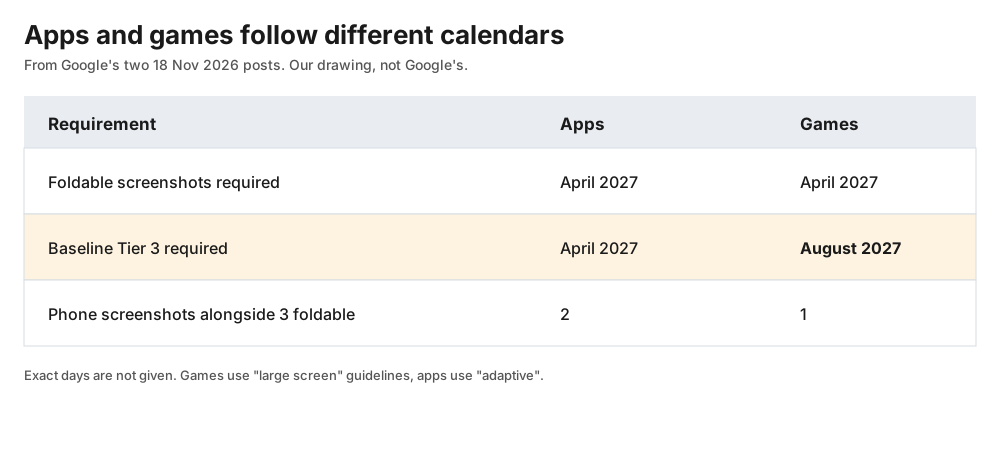
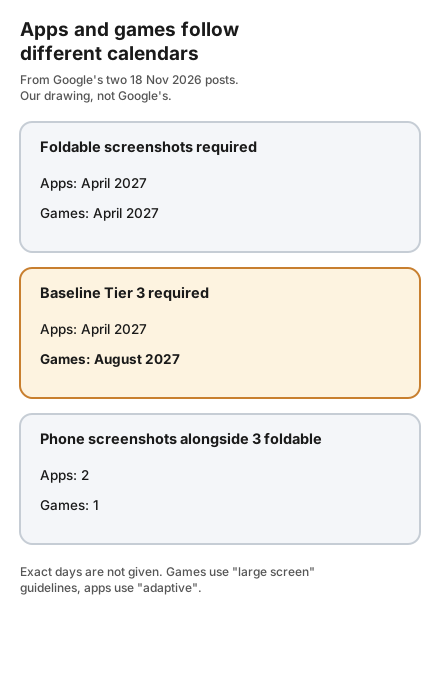
Original comparison by Omnistu from Google's two 18 November 2026 posts. Not Google's figure.
- Now (November 2026): developers can upload foldable screenshots in Play Console.
- April 2027: new games and updates must include dedicated foldable screenshots when submitted. Google says at least 3 foldable screenshots are required, in addition to the standard 1 phone screenshot, in the game's primary orientation.
- August 2027: games must meet baseline Tier 3 (Ready) for large screens and foldables to publish new games and updates.
For apps, Google's separate post sets both the screenshot requirement (3 foldable plus the standard 2 phone screenshots) and the Tier 3 baseline for April 2027, and adds an August 2027 deadline for apps to target API level 37 (Android 17); the games post sets no API-level deadline. The app guideline pages use the name "adaptive". The games rules use "large screen" instead, and Google explains why on its guidelines page: not every game can reflow a portrait game board into a landscape layout, so games render across defined anchor aspect ratios and cleanly letterbox or pillarbox outside them.
What Tier 3 (Ready) asks of a game
Google's announcement says Ready games render full screen in their supported orientation or orientations, keep the heads-up display (HUD) inside unobstructed safe areas, letterbox or pillarbox cleanly in the engine when rotated to an unsupported orientation, and preserve state and touch alignment across folding, unfolding, rotation and multi-window resizing. The guidelines page adds that Ready games support multi-window and multi-resume continuity.
Google describes two higher tiers. Tier 2 (Optimized) adds high-resolution graphics, proportional HUD scaling, styled framing when letterboxing, smooth frame pacing, and full playability with external controllers, keyboards and mice. Tier 1 (Differentiated) is defined per form factor, and for foldables covers sustained 60 FPS (120 FPS on supported displays), thermal and battery stability, and dynamic resolution scaling between inner and cover screens. Only Tier 3 is required. Google says Tier 1 and Tier 2 unlock foldable Play Store badging and enhanced merchandising.
The screenshot formats
Google lists three cases, all in the game's primary orientation:
- Standard phones: a screenshot at 16:9 (landscape) or 9:16 (portrait).
- Foldables with a 1:1 inner display: at least one inner-display screenshot at 1:1. No separate outer-screen screenshot is required.
- Foldables with a 4:3 inner display: at least one inner screenshot at 4:3 or 3:4, and at least one outer-screen screenshot at 16:10 or 10:16.
Google says screenshots from the Android Emulator's 1:1 and 4:3 foldable devices comply with the requirement.
Why it matters, per Google
Google's guidelines page says Play ranks optimized games higher than unoptimized ones, and that games that do not meet at least Tier 3 on specific devices "might not appear in search results" unless a player searches for the game directly. It describes this as a visibility effect on specific devices, and gives no measure of how large the effect is.
What the sources do not say
- The exact day in April or August 2027.
- Whether games that only support one orientation are exempt from the foldable screenshot rule. Google says screenshots should be in the game's primary orientation, which suggests they are not, but the pages do not address it directly.
- Which Tier 3 tests Play Console will check automatically, as opposed to Google measuring them elsewhere.
- Whether existing, un-updated games stay downloadable after August 2027. The app post says existing un-updated apps remain downloadable; the games post does not say either way.
- How the August 2027 foldables focus will extend to tablets and other large screens. Google says it plans to extend these requirements "in future phases" and names tablets and Googlebook laptops.
A starting point, our suggestion
Run Google's own tests on a 1:1 and a 4:3 foldable emulator, or a device simulator in your engine, and record where the game loses state, offsets touch input, or cuts off the HUD when folding, unfolding and rotating. Google says Unity and Unreal have added resizing and configuration-change handling, so engine settings are the first place to look. Capture the foldable screenshots from the emulator profiles at the same time.
This guide was prepared with AI assistance and reviewed on 19 November 2026.
Sources
- Android Developers Blog, Elevating games: New large screens and foldables quality standards on Google Play (18 November 2026, read 19 November 2026)
- Android game development, Large screen quality guidelines for games (read 19 November 2026)
- Android Developers Blog, Elevating apps: New adaptive quality standards on Google Play (18 November 2026, read 19 November 2026; app-side comparison)