iOS app handover: what to check before an App Store transfer
Before changing agencies, separate App Store team access, app-transfer eligibility, capability handover and two different 60-day deadlines. Apple-only planning guide, not a transfer runbook.
If your agency published your iPhone app under its developer account, receiving a source-code repository is only part of the handover. Ask which team holds the App Store record, who can authorize a transfer and which app capabilities need work before the next update.
This Apple-only planning guide uses current Apple documentation checked on 19 November 2026. It does not determine contractual ownership, confirm that your app is eligible, or provide a transfer runbook. No app or account was transferred or tested for this article. Google Play has a separate process.
A developer invitation, an app transfer and an Account Holder change are different
Apple's roles documentation explains that a team member's role controls access to development and distribution tools. The Account Holder has responsibilities such as accepting agreements and renewing an organization's membership. Having access to an app is not evidence that its App Store record has moved to another team.
For an existing app moving between developer accounts, Apple's app-transfer overview describes a transfer initiated by the sending Account Holder and accepted by the receiving Account Holder.
Changing the Account Holder role is a separate route. For an organization, Apple describes transferring that role to another employee on the team with authority to bind the organization to agreements. That is not the same as moving one client's app out of an agency account. Individual-membership role transfers have limited cases and require Apple Developer Support.
Before asking anyone to act, establish which of these situations you have. Do not use a shared Apple Account password as a substitute for appropriate team access. If rights, identity or control are disputed, get qualified legal advice and use Apple's support channels rather than assuming a contract or invoice changes the store record automatically.
Check eligibility against the actual app, not an old tutorial
The current transfer criteria include account/agreement conditions, at least one released App Store version, restrictions on pre-orders and app statuses, and conditions for In-App Purchases. There are also app-specific exclusions. This is a selected summary, not a complete eligibility test.
Ask the outgoing and receiving teams to record the result of checking the current criteria, including anything blocked or unknown. An unreleased app, a release currently in review and an app with purchases can raise different questions. Do not infer eligibility because another app transferred successfully.
Older forum answers can describe retired terminology or restrictions. A 2013 community question about moving apps between company accounts shows that the question is longstanding, not that its old procedural answers are current. Apple's current overview includes specific preparation for Sign in with Apple and iCloud; a blanket claim that either capability always makes transfer impossible is not a safe substitute for today's criteria.
Two 60-day references, with different starting events
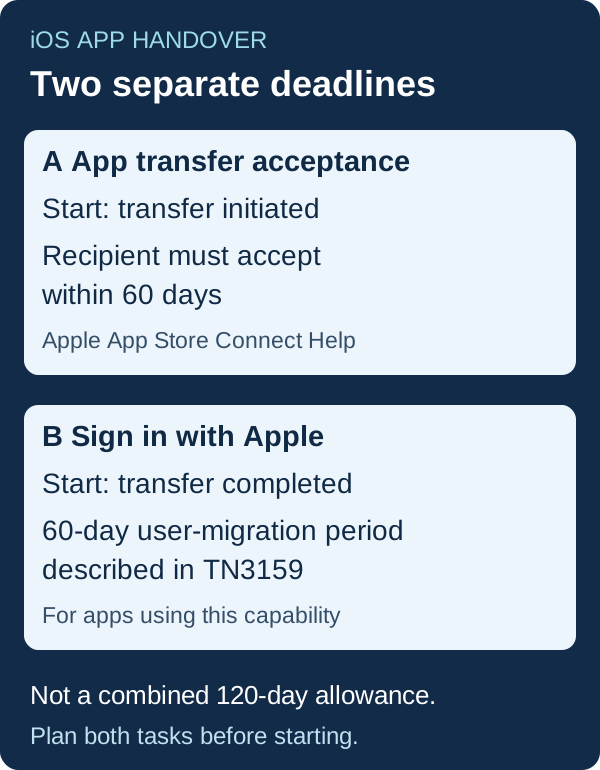
Apple's initiation page and acceptance page say the recipient must accept an app transfer within 60 days of initiation.
For apps using Sign in with Apple, TN3159 describes a separate 60-day user-migration period from the date the app transfer completes. It covers exchanging transfer identifiers between developer teams so existing users can be associated with the receiving team.
Those are different events and different tasks. Do not turn them into a promised 120-day allowance or wait until the last day to discover that user migration has no owner. Before initiation, agree who prepares user migration, who performs the receiving-side work and what evidence will show existing-user access still works. Do not put user identifiers, private relay addresses, access tokens or signing secrets in a public handover document. Follow the full Apple procedure with the teams responsible for the app and its backend.
A live listing is not proof that the first update is ready
Apple says an app transfer can retain the listing's reviews, ratings and Bundle ID while the app remains available for download. Its overview also lists capability-specific work. Ask the team to map the capabilities actually used, rather than treating the store listing as the whole system.
Selected examples from the current overview:
- Keychain sharing: Apple describes a boundary at the app update. The receiving team needs to address the keychain configuration, and users must log in again after the update described in that guidance.
- Push notifications: certificate validity and expiry matter. If APNs keys are used, the receiving team's chosen key must be reflected in its push servers. Do not describe keys and certificates as one interchangeable asset.
- Apple Pay: the merchant ID does not transfer with the app. Apple's guidance distinguishes transactions under valid original certificates from the requirements for an update.
- TestFlight and Xcode Cloud: Apple describes preparation affecting beta builds, testers and cloud data before transfer. Agree a controlled plan, required records and responsible people before anyone removes anything.
- Sign in with Apple, iCloud, subscriptions and other capabilities: use the relevant sections of the overview and linked documentation for the actual app. Shared dependencies can affect more than one app.
These are prompts for a scoped review, not instructions to delete data, rotate credentials or alter a live app. A successful listing transfer is not a security certification or a guarantee that login, purchases, pushes and the next release have been validated.
Keep source, backend and acceptance evidence in the handover
Apple states that the sending team exchanges the actual code and build assets directly with the receiving team. The store transfer is not a source-code delivery service. Apple's acceptance page also calls for new provisioning profiles in the recipient's developer account after transfer.
For the buyer's next discussion, prepare a non-confidential summary of:
- The app's store link and the sending/receiving teams responsible for the proposed move.
- Current eligibility checks, release plans and unresolved decisions.
- Capabilities, backend dependencies and who will handle their transition.
- Source/build documentation and the evidence needed for the first receiving-team release.
- Both deadline owners, support contacts and how changes will be approved.
Use the codebase handoff guide for repository and operating documentation beyond the store. Use the iOS review checklist for submission preparation, which remains separate from a transfer.
If you want to discuss implementation help, the native iOS development scope describes the areas to discuss with Omnistu. Bring the non-confidential summary, not account passwords or customer data. Eligibility, access, implementation, price and delivery need their own agreed scope. This article does not start paid work or promise a transfer outcome.