Check the "next" URL before you redirect after login
Check the next URL before redirecting after login. Python fixtures cover ID mapping, local-path refusal and parsed-host allowlisting for external targets.
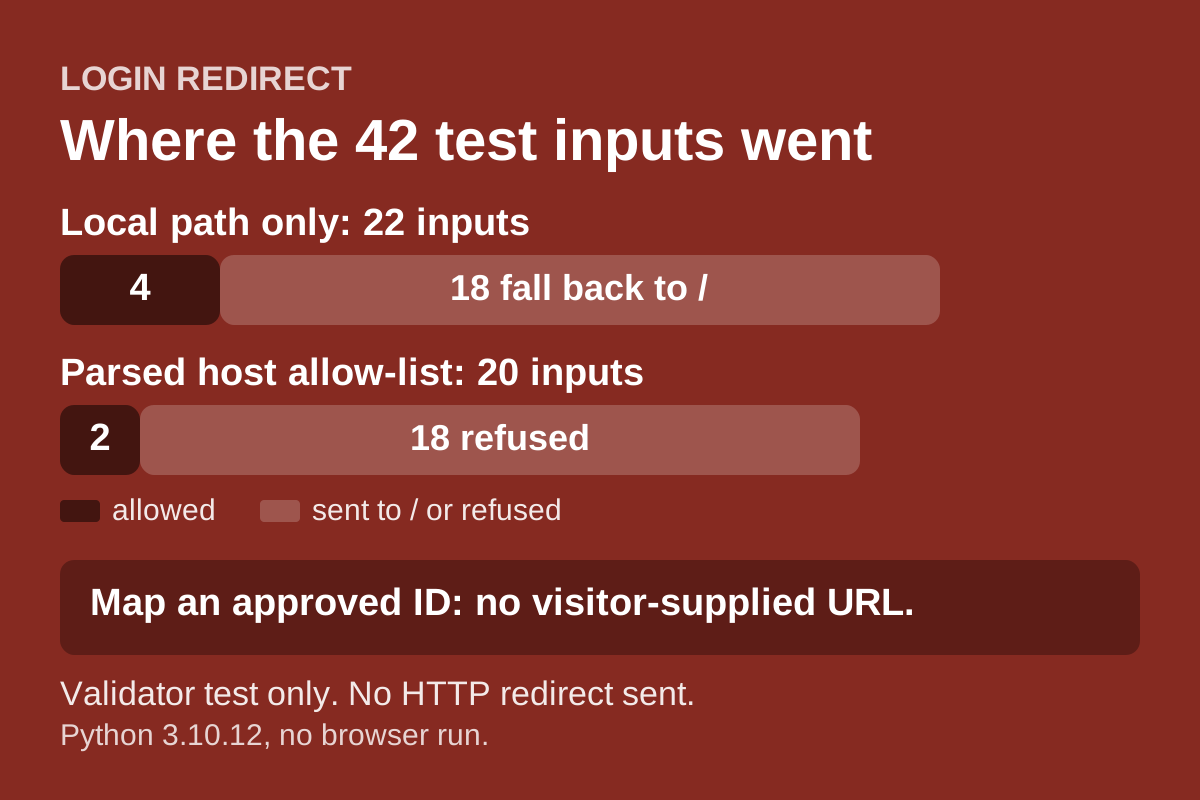
A login page that sends people back to where they were is convenient. The destination usually travels in a parameter, such as next or returnUrl. If the server redirects to whatever that parameter holds, an attacker can build a link on your real domain that bounces the visitor to a site they control. The link looks trustworthy because the first part is yours.
The OWASP Unvalidated Redirects and Forwards Cheat Sheet describes this as a phishing risk and lists safer options. Avoid redirects if you can. Do not take the destination URL as user input. Have the user supply a short name or ID that the server maps to a full URL. If input cannot be avoided, validate it. For local return URLs, use a framework helper that rejects non-local destinations. For external destinations, allow-list approved ones by their parsed scheme, canonical host and effective port, reject userinfo and ambiguous input, and do not use raw prefix or suffix matching.
This guide tests those ideas in a small Python module with 42 URL input cases, plus ID-mapping checks. It was prepared with AI assistance and reviewed on 18 November 2026. It tests a validator. It does not send any HTTP redirect.
Option one: map an ID to a destination
Mapping an approved ID removes visitor-supplied destination URLs from this design. OWASP prefers server-side destination mapping to accepting arbitrary URLs, while warning that IDs can expose the list of targets.
DESTINATIONS = {'home': '/', 'billing': '/account/billing',
                'docs': 'https://docs.example.test/start'}

def by_id(dest_id):
    return DESTINATIONS.get(dest_id, DESTINATIONS['home']) if isinstance(dest_id, str) else DESTINATIONS['home']
The visitor never supplies a URL, so there is nothing to tamper with. Unknown IDs, None and anything else fall back to the home page. The sheet adds one caution: IDs can be cycled to discover every possible target, so do not treat the list as secret.
Option two: accept only a plain local path
Sometimes you need to return the user to an arbitrary page on your own site. The fixture accepts a value only if it starts with a single slash, contains no scheme or host, and has no characters that parsers read differently.
def local_path(value, default='/'):
    if not isinstance(value, str) or not value or len(value) > 200:
        return default
    if any(ord(c) < 0x21 or ord(c) == 0x7f for c in value) or '\\' in value or '%' in value:
        return default
    if not value.startswith('/') or value.startswith('//'):
        return default
    parts = urlsplit(value)
    if parts.scheme or parts.netloc:
        return default
    return value
Four ordinary paths pass, including one with a query and one with a fragment. Eighteen inputs fall back to /:
//evil.testand///evil.test, which browsers can read as a host./\evil.testand\\evil.test, because some browsers treat a backslash like a slash.https://evil.test,javascript:alert(1),data:URLs and a bareevil.test.- Paths with a space, tab or newline in them.
- Percent-encoded slashes such as
/%2f%2fevil.test. - An empty string, a 300-character value,
Noneand a number.
Refusing every percent sign is deliberately blunt. It will also turn away a legitimate path that contains an encoded character. That is a trade-off to review for your own URLs, not a rule from OWASP.
Option three: allow-list parsed external destinations
For an external site, the fixture parses the URL and compares scheme, host and port against a set. It rejects userinfo, a missing host, control characters and backslashes.
The parser call and port lookup are caught together so malformed bracketed hosts fail closed instead of raising an exception. An explicit port zero is not silently treated as the default port.
The allowed form https://docs.example.test/start passes, and so does the same host with the default port written out. Eighteen inputs are refused, including a host that only starts with the allowed name (docs.example.test.evil.test), a path or query that merely contains it, userinfo that makes the real host evil.test, plain http, port 8443, a similar-looking sibling host, a protocol-relative URL, a zero port, a malformed port and malformed bracketed host.
These are the kinds of mismatches the cheat sheet points to when it warns against prefix and suffix matching and mentions GitLab's userinfo and misleading-hostname bypasses.
Limits
All checks pass on Python 3.10.12. The module uses Python's urllib.parse. The cheat sheet says to use a parser compatible with your redirect API and with how browsers interpret the URL, and this fixture did not run a browser or send a Location header, so it cannot show that the two agree. The conservative refusals are meant to cover some of that gap, not close it.
The test also does not cover forwards, where the sheet says the application must check that the user is authorized for the target. It does not cover the interstitial warning page the sheet suggests for leaving the site, nor logging of refused values. Real frameworks may offer a local-redirect helper, and the sheet says to prefer one.
Sources
- OWASP Unvalidated Redirects and Forwards Cheat Sheet: https://cheatsheetseries.owasp.org/cheatsheets/Unvalidated_Redirects_and_Forwards_Cheat_Sheet.html