Quad9 plans to leave France on 24 November: where to check your DNS settings
Quad9 plans a France withdrawal on 24 November. A source-attributed timeline and documented ways to inspect DNS settings, with browser, router and legal limits.
Quad9 says it plans to withdraw its free public DNS service from users in France on Tuesday 24 November 2026. The Swiss nonprofit announced the decision on 22 October. If a device or browser depends only on Quad9, name lookups could fail after the withdrawal. This is a guide to checking settings, not a prediction that every French user's internet will stop working.
What Quad9 says happened
In its 22 October statement, Quad9 says a French court ruled against it the previous day in a case brought by beIN over domains the broadcaster alleges infringe its sports broadcasting rights. Quad9 reports that the court reduced a daily penalty from €580,000 to €1,000. We have not read the ruling and are not independently confirming its legal scope, reasoning or amounts.
Quad9 argues that it cannot reliably identify which users fall within the French jurisdiction without changing its privacy approach, and that blocking the domains globally would extend a national decision to users elsewhere. Those are the service operator's arguments, not a finding by this article that geographic blocking is technically impossible. Quad9 says an appeal is pending and approximately 20 other cases are pending in France.
Cloudflare, which operates the competing 1.1.1.1 resolver, published its response on 17 November. It argues that resolver-level blocking does not remove the underlying content, and warns that organizations relying on Quad9 may lose name resolution without a clear explanation. Its examples include government bodies, schools, hospitals and utilities. We have not verified which organizations currently use Quad9 or whether their systems have alternatives.
Cloudflare also says it, Google and Cisco have appealed a Belgian order that would impose penalties unless their public resolvers start blocking by early January 2027. That is Cloudflare's account of a separate case, not a France withdrawal deadline for those other providers. We have not read that order either.
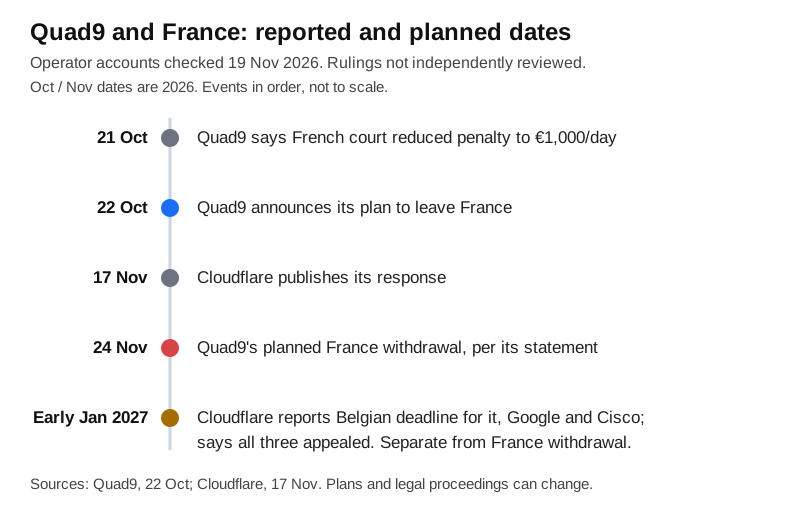
Original Omnistu timeline, checked on 19 November 2026. October and November dates are in 2026. Events are in order, not drawn to scale. The withdrawal is planned, not an event we have observed.
Check settings at more than one layer
A system DNS setting is a useful starting point, but it does not prove which resolver every app ultimately uses. Mullvad's own advisory shows why: a browser can use DNS over HTTPS separately from the operating system. A local or router address also does not identify its upstream provider. On a managed work or school device, ask the administrator before changing anything.
- Windows: Microsoft's DNS troubleshooting guide says to run
ipconfig /alland check the DNS servers listed in the output. Look at the adapter for the connection you are actually using. This displays configuration; it is not a test of every application's DNS path. - Mac: Apple's documented route is Apple menu, System Settings, Network, your network service, Details, then DNS. Inspect the DNS Servers list.
- Linux using systemd-resolved:
resolvectl statusshows the global and per-link DNS settings currently in effect, according to its manual. This applies to systems using that service, not every Linux installation. It does not identify a router's upstream resolver or a browser's separate DNS provider. - Router and other devices: Check the provider's instructions and the upstream DNS configuration, not only the address handed to a computer. CyberInsider advises reviewing operating-system, router and other-device settings separately. Do not assume one browser change fixes every device.
- Mullvad Browser in France: Mullvad's 17 November advisory points to Settings, Privacy and security, DNS over HTTPS. If Quad9 is selected, it recommends choosing another provider. For users connected to Mullvad VPN, Mullvad instead recommends turning browser DNS over HTTPS off so DNS goes through the VPN. Without a VPN, turning it off can expose lookups to the network or ISP, as the advisory notes. This is not a blanket recommendation to disable encrypted DNS.
If you find Quad9 in a setting that you control and rely on in France, review a replacement before the planned cutoff. The cited articles mention several public resolvers, but that is not proof that each is available in France: Cloudflare's own post says Cisco previously withdrew OpenDNS there. Check the replacement operator's current regional availability, privacy policy and setup instructions. We have not tested or ranked alternatives and are not recommending an automatic switch to a particular vendor.
What remains uncertain
These are operator statements and documented settings checks, not a live test of Quad9, the commands or the planned withdrawal. We cannot confirm exactly how failed requests will appear, whether particular networks have fallback paths, or whether legal developments will change the plan. The French and Belgian rulings were not read. Quad9 and Cloudflare have stated positions in these disputes; Mullvad is a browser and VPN provider with its own product advice. No system settings were changed for this article. Prepared with AI assistance and reviewed on 19 November 2026.
Sources
- Quad9, Farewell, France, 22 October 2026: https://quad9.net/news/blog/au-revoir-france/
- Cloudflare, Quad9's withdrawal from France, 17 November 2026: https://blog.cloudflare.com/quad9-withdrawal-from-france/
- Mullvad, Quad9 will withdraw their DNS service from France, 17 November 2026: https://mullvad.net/en/blog/quad9-will-withdraw-their-service-from-france
- CyberInsider, Mullvad's advisory and context, 18 November 2026: https://cyberinsider.com/mullvad-browser-quad9-dns-france-withdrawal/
- Microsoft, ipconfig command documentation: https://learn.microsoft.com/en-us/windows-server/administration/windows-commands/ipconfig
- Microsoft, Troubleshooting DNS clients: https://learn.microsoft.com/en-us/windows-server/networking/dns/troubleshoot/troubleshoot-dns-client
- Apple, Change DNS settings on Mac: https://support.apple.com/guide/mac-help/change-dns-settings-on-mac-mh14127/mac
- resolvectl manual, status command: https://man7.org/linux/man-pages/man1/resolvectl.1.html