Escape LIKE wildcards as well as binding search values
Escape LIKE wildcards in search boxes as well as binding parameters. SQLite fixtures cover percent, underscore, backslash, injection text and ASCII case.
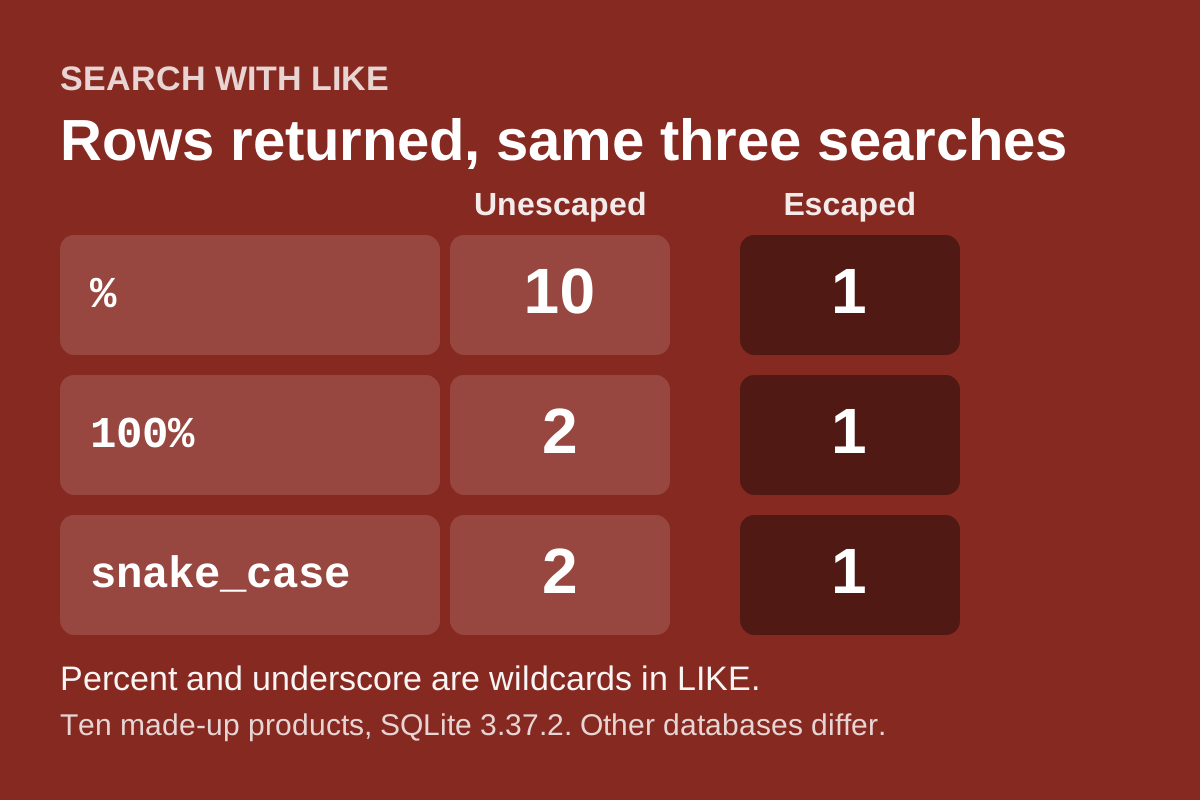
A product search box takes text and runs name LIKE '%text%'. A careful developer binds the text as a parameter, so a quote mark cannot break out of the SQL. In this fixed SQL statement, binding keeps the search value separate from SQL syntax. It does not fix a second problem: inside a LIKE pattern, the percent sign and the underscore are wildcards. A visitor who types % is not searching for a percent sign. They are asking for every row.
SQLite's expression documentation defines the behavior. In a LIKE pattern, % matches any sequence of zero or more characters and _ matches any single character. An optional ESCAPE clause names a single character that makes the next %, _ or the escape character itself match literally. The same page notes that matching is case-insensitive for ASCII letters only by default, so 'a' LIKE 'A' is true while 'æ' LIKE 'Æ' is false.
This guide tests a small search function against those rules. It was prepared with AI assistance and reviewed on 18 November 2026. It uses SQLite 3.37.2 with ten made-up product names.
Show the problem first
The fixture holds names such as 100% Cotton Tee, 100 Cotton Tee, snake_case mug, snakeXcase mug, back\slash pin, O'Brien poster and a name that contains a SQL statement as plain text. The unescaped query binds the text but treats it as a pattern:
- A search for
%returns all ten rows. - A search for
100%also returns100 Cotton Tee. - A search for
snake_casealso returnssnakeXcase mug.
None of these is a security breach on its own, but the results are wrong for what the visitor typed.
Escape the text, then bind it
def escape_like(text, esc='\\'):
    return text.replace(esc, esc + esc).replace('%', esc + '%').replace('_', esc + '_')

def search(db, text, limit=50):
    if not isinstance(text, str) or not text.strip() or len(text) > 100:
        return []
    limit = min(max(limit, 0), 50) if type(limit) is int else 50
    pattern = '%' + escape_like(text.strip()) + '%'
    return [r[0] for r in db.execute(
        "SELECT name FROM items WHERE name LIKE ? ESCAPE '\\' "
        "ORDER BY name LIMIT ?", (pattern, limit))]
The escape character is escaped first, so a backslash typed by the user does not turn into an escape for the character after it. The pattern is still passed as a bound parameter. The two steps solve different problems: binding keeps these query values separate from SQL syntax, and escaping makes wildcard characters literal. Neither is a blanket guarantee about other queries or dynamically built identifiers.
What the run asserts
100%returns only100% Cotton Tee, and%returns only that row too.snake_caseand a bare_return onlysnake_case mug.- A single backslash and
back\slashfind the backslash name. The text\%finds nothing, because no name contains a backslash followed by a percent sign. O'Brienfinds the poster. The text"); DROP TABLE items;--finds the row that contains it as plain text, and the table still has ten rows afterward.plainreturns bothPlain hatandplain Cap, so ASCII case is ignored.ætherreturns nothing whileÆtherfinds the lamp, which confirms the documented non-ASCII behavior. That is a limit shown here, not a fix.- Extra spaces around the text are trimmed.
- An empty string, spaces only,
None, a number and a 101-character string all return an empty list. - A separate boundary check adds 60 matching names: a requested limit of 10,000 returns exactly 50, a limit of three returns three, zero or negative returns none, and a non-integer limit uses 50.
The empty-input and 100-character rules are product choices. A real search page may want to show recent items for an empty box. The test only proves the function does what it says.
Limits
This is a unit test against a tiny in-memory table. It does not test full-text search, which is a separate feature with its own rules. It does not test another database, whose LIKE and escape rules may differ, or the ICU extension that the SQLite page says can fold case beyond ASCII. It does not measure speed, and it does not cover pagination, ranking or typo handling.
Sources
- SQLite documentation, Expressions (LIKE and ESCAPE): https://www.sqlite.org/lang_expr.html