Siri AI Developer Preview: what app developers can do now with tool intents and app skills
Apple's 3 November 2026 Developer Preview lets any developer connect an app to Siri AI with App Intents in the 27.3 betas. What tool intents and app skills are, the rules Apple documents, what is still undecided, and a short checklist.
On 3 November 2026 Apple opened a Developer Preview that lets any developer connect an app to Siri AI through App Intents. It runs in the 27.3 betas of Apple's operating systems. This guide sets out what Apple's notice and two documentation pages say about the two building blocks, tool intents and app skills, what is still undecided, and a short checklist. Everything below is Apple's account unless we say otherwise. We did not build or test an integration, and Apple says the API and Siri behavior may change during the preview.
Where the preview stands
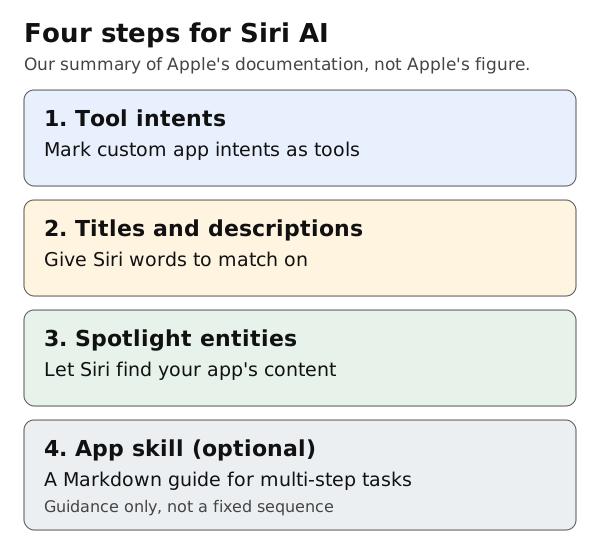
Original summary by Omnistu from Apple's documentation. Not Apple's figure.
Apple's notice says the preview gives early access before Siri AI first ships to customers "in a few months", with App Store submission "opening up in the spring". It also says:
- Siri AI needs an Apple Intelligence-enabled device set to a supported language. It is in beta in iOS 27.3, iPadOS 27.3, macOS 27.3, watchOS 27.3 and visionOS 27.3. Apple lists English, French, Japanese, Korean, Portuguese and Spanish, with Traditional Chinese, Norwegian, Turkish and Vietnamese coming.
- Siri AI is currently unavailable in the EU on iOS, iPadOS and watchOS. Apple says it is working with the EU on a path forward.
- It is not available to users under 13.
- Apple will follow up with "more details about the terms and usage policies" for experiences enabled through Siri AI.
- Features that use server-side models are subject to daily usage limits.
Step 1: turn custom intents into tools
Apple's documentation says Siri can only find content and perform actions you make explicitly available. To expose a custom action, add the @AppIntent(.tool) Swift macro to a new or existing app intent, which makes it a tool intent.
Rules from the page:
- If an intent already conforms to a schema in a primary domain listed in Apple's App schema domains, do not add the macro. Conforming to the schema already makes the action available to Siri.
- Do not add the macro to an intent that has no custom action in
perform(), such as a widget configuration intent. - Adding any tool intent to your app makes your App Shortcuts unavailable to Siri. They remain available to Spotlight and the Action button, so Apple says not to remove them. Make sure your tool intents cover what the shortcuts did.
Step 2: give Siri words to match on
Siri matches what a person says to your actions using each intent's title and description, and each parameter's title and description. Apple's example, an "Add to Cart" intent, gives both for the intent and for item and quantity parameters.
Step 3: let Siri find your content
To let Siri find your app's content, make your app entities available to Spotlight. Apple also describes onscreen context, so people can refer to visible content, and transferable representations, so Siri can pass an entity from one intent to another.
Step 4: add an app skill for multi-step tasks
A tool intent performs one action. For tasks that need several, Apple says you can provide an app skill: a Markdown file that tells Siri how tool intents fit together, which to prefer, what to avoid and any domain knowledge.
Requirements from the page:
- Add a
Skills.skillsbundleto the Xcode project and the target's Copy Bundle Resources phase. An app target can have only one. - Each skill is a folder named in lowercase letters, digits and hyphens, containing a
SKILL.mdfile and nothing else. - The metadata needs a
name(1 to 64 characters, matching the folder name) and a one-linedescriptionof up to 1,024 characters. Siri reads the description to decide if the skill applies, and the body only after a match. - If the bundle is missing from the target or has compile errors, the app provides no skills to Siri.
- Apple says skills cannot enforce deterministic behavior. Siri does not necessarily perform the listed tool intents in order.
What is still open
- The terms and usage policies for Siri AI experiences, which Apple says are to come.
- The exact ship date and the date App Store submission opens.
- EU availability.
- How many daily requests a developer's users get, and what the future fee for expanded access is.
A short checklist, our suggestion
- List the three or four actions people would most want to ask Siri for, and check which are already schema-based intents.
- For the rest, write clear titles and descriptions before adding the macro.
- Check what your App Shortcuts do today, since adding a tool intent changes their availability to Siri.
- Treat the preview as a test: Apple says things may change.
This guide was prepared with AI assistance and reviewed on 19 November 2026.
Sources
- Apple Developer News, "Siri AI is now open to all developers" (3 November 2026): https://developer.apple.com/news/?id=gdk2umrf
- Apple Developer Documentation, "Bringing custom actions and content to Siri": https://developer.apple.com/documentation/appintents/bringing-custom-actions-and-content-to-siri
- Apple Developer Documentation, "Orchestrating complex actions with app skills": https://developer.apple.com/documentation/appintents/orchestrating-complex-actions-with-app-skills.md